



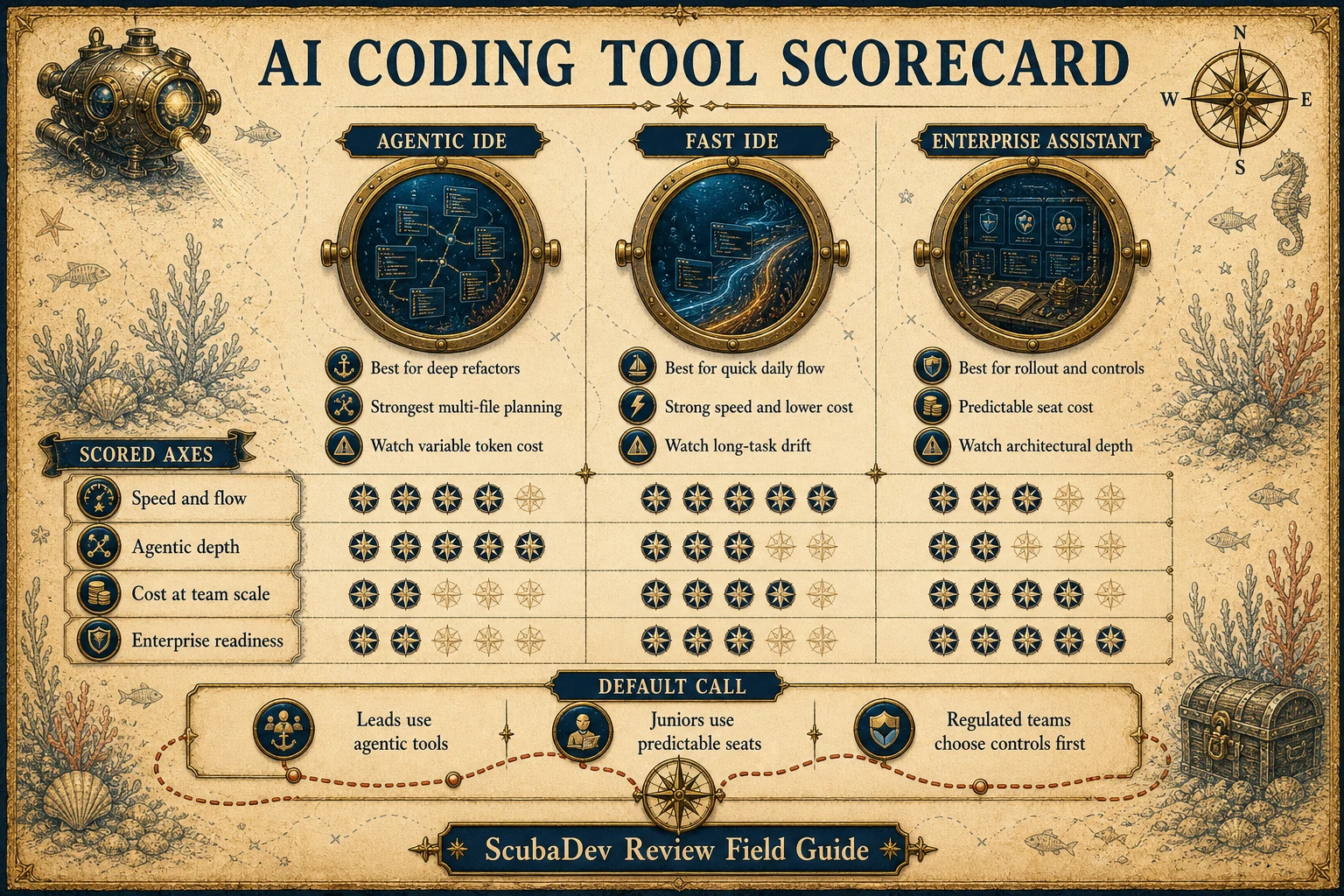
Cursor wins on raw agentic depth and the cleanest multi-file refactor experience. Windsurf wins on speed and cost, with SWE-1.5 giving it the fastest day-to-day flow. Copilot wins on enterprise fit, GitHub integration, predictable billing, and rollout speed.
The ScubaDev default is not one tool for everyone. Cursor belongs with senior builders running agentic sessions. Windsurf fits fast, budget-aware product teams. Copilot fits enterprise estates, juniors, contractors, and teams that need predictable spend.
Below the surface
Every engineering team we onboard in 2026 runs one of three AI coding tools as a daily driver: Cursor, Windsurf, or GitHub Copilot. We have shipped production code in all three across the last twelve months, so this comparison is grounded in real refactors, pull requests, cost lines, and rollout constraints.
The useful question is not which AI IDE has the loudest feature list. It is which tool fits your workflow owner, risk model, budget shape, and appetite for agentic work.


01 / Comparison method
How we ran the comparison
Twelve months of production usage across ScubaDev engineers and client repos. The evaluation axes match how teams actually buy: speed and flow, agentic depth, and cost at team scale.
| Axis | What it measures | Why it matters |
|---|---|---|
| Speed and flow | Prompt latency, UI friction, and prompts needed to land real work. | The best daily tool gets out of the way while you ship. |
| Agentic depth | Planning, multi-file reach, test runs, branches, and PR-shaped work. | This separates autocomplete from a real engineering partner. |
| Cost at team scale | Seat price, token behavior, overages, and predictability. | Cheap seats can become expensive when agentic runs meter compute. |


By the numbers
The production sample behind the tool picks
Production use
12mo
Production usage window across ScubaDev and client repos.
Windsurf speed claim
13x
Published SWE-1.5 output-speed multiple versus Sonnet in Cognition launch data.
Copilot business
$76
Approximate monthly cost for four Business seats at listed pricing.
Tool field
3
Daily-driver IDE options compared: Cursor, Windsurf, and GitHub Copilot.






03 / Pricing and cost
Sticker price is only half the bill
Public list pricing is the easy part. Cursor and Windsurf can add model pass-through or overage costs. Copilot bundles compute into the seat fee and stays predictable.
| Tool | Free tier | Individual | Team | Enterprise |
|---|---|---|---|---|
| Cursor | Yes, limited | $20 per month | $40 per seat | Custom |
| Windsurf | Yes, real | $15 Pro | $30 per seat | Custom |
| GitHub Copilot | Students and OSS | $10 per month | $19 Business | $39 per seat |
Cursor is the value pick for heavy senior builders when agentic sessions replace real engineering hours. Windsurf is the price-per-feature winner. Copilot wins predictable billing and the lowest four-seat sticker price.


The capability checks that decide the tool
Most teams can decide by looking at six tool surfaces instead of debating brand loyalty.
- 01
Speed and flow
Windsurf wins the daily small-to-medium task loop. Cursor wins when the task stretches past a short prompt. Copilot stays strongest as inline assistance.
- 02
Agentic depth
Cursor is the clear pick for multi-step work, cloud agents, subagents, and refactors that need to inspect many files.
- 03
Multi-file refactors
Cursor has the cleanest review surface for broad diffs. Windsurf is strong with Codemaps. Copilot trails on free-form refactors.
- 04
Autocomplete
All three are competent. Copilot still has the most polished inline suggestion ergonomics and the simplest enterprise adoption path.
- 05
Enterprise readiness
Copilot wins for GitHub Enterprise shops. Windsurf matters when FedRAMP is required. Cursor Enterprise is credible for most commercial regulated teams.
- 06
Privacy and model options
Cursor gives the widest model choice. Windsurf offers self-host paths for enterprise. Copilot is easiest where GitHub governance is already approved.



05 / Where each breaks
Different tools, different failure modes
None of these tools is bad. The hidden cost is the failure mode you need your team to notice before production code drifts.
| Tool | Where it breaks | Operating rule |
|---|---|---|
| Cursor | Variable model costs can spiral on stuck agentic loops, and Composer can misread repo convention. | Keep git clean and kill unbounded loops quickly. |
| Windsurf | Long-running tasks drift sooner, and edge-case frameworks can exceed SWE-1.5 depth. | Use Cascade for fast work, then escalate deep refactors. |
| Copilot | The Coding Agent can open a compiling PR that has the wrong architectural shape. | Use it for constrained issues, autocomplete, and enterprise workflows. |
06 / Team picker
Which one should you pick?
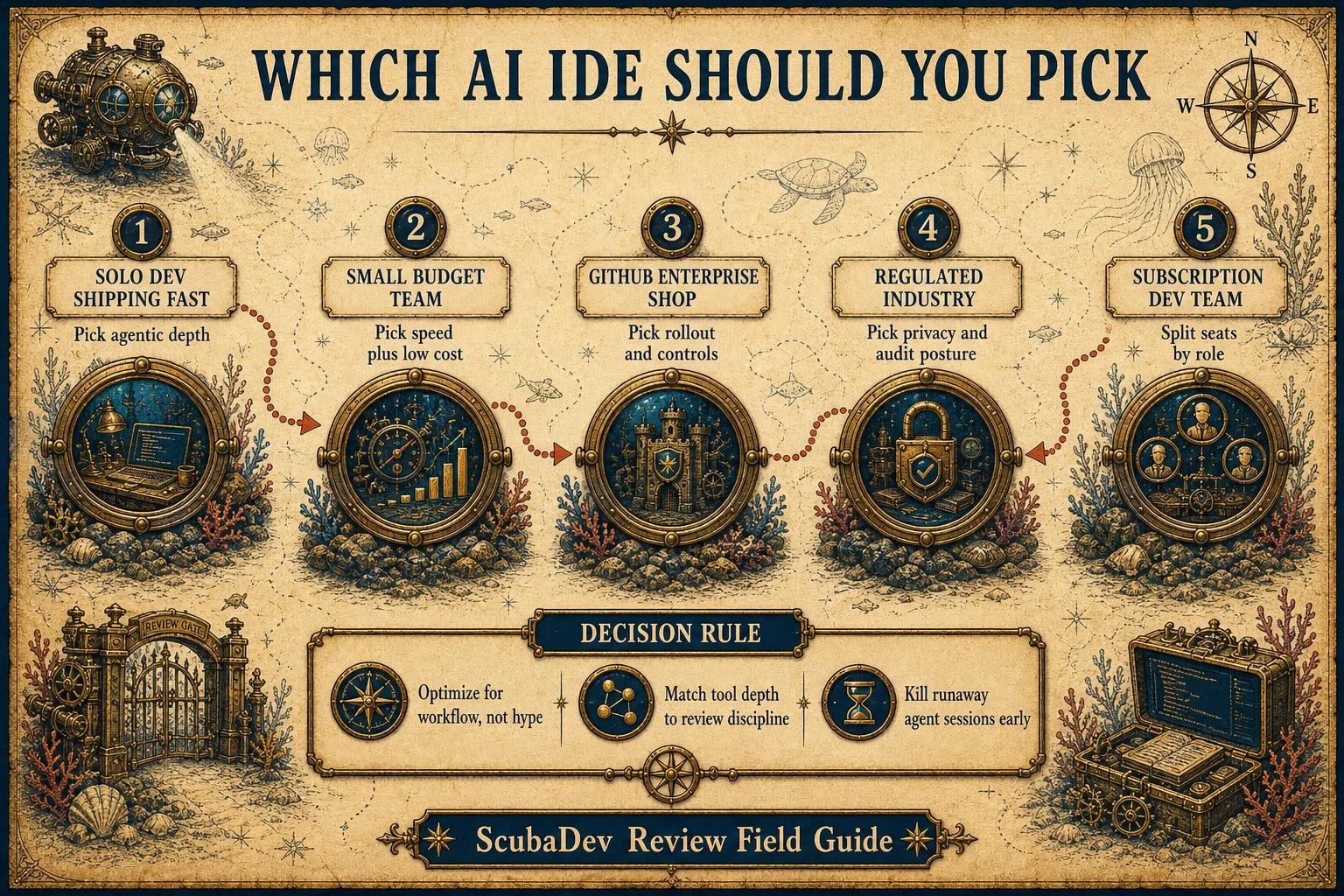
Five team profiles cover the realistic decision space. The ScubaDev stack uses a split because seniors, contractors, enterprise rollouts, and product teams need different constraints.
- 01
Solo dev shipping SaaS quickly
Cursor. Agentic depth and model flexibility pay off fast when one person owns the whole stack.
- 02
Small, budget-conscious team
Windsurf. Best price-per-seat and good enough performance for most daily engineering tasks.
- 03
GitHub Enterprise shop
Copilot. Billing, SSO, policy, and rollout already live where the engineering org works.
- 04
Agency or subscription dev team
Split the stack. Cursor for senior agentic sessions, Copilot for predictable seats, and Windsurf where a product team optimizes for fast flow.






FAQ
Which one is fastest for daily coding?
A: Windsurf on raw model latency thanks to SWE-1.5. All three are fine for the actual feel of typing plus AI suggestion.
Which one is best for agentic tasks?
A: Cursor. Composer plus cloud agents plus subagent pool is the deepest agentic surface of the three.
Is GitHub Copilot falling behind?
A: It has caught up on enterprise features and ships a real Coding Agent surface. It still trails on free-form agentic depth.
Does Claude Code replace any of these?
A: For terminal-heavy, agent-heavy workflows, yes. For in-IDE work, no. We run Claude Code alongside Cursor.
Can I use one model across all three tools?
A: Cursor supports the widest model choice. Windsurf includes SWE-1.5 plus Claude and OpenAI for Pro and higher. Copilot uses a multi-model backend at GitHub's discretion.
Is vibe coding worse on these tools than plain coding?
A: Worse. Agentic tools amplify bad patterns. If you cannot review what the agent produced, you will ship bugs at speed.
What is the minimum team size to care about this choice?
A: One. A solo developer will feel the difference inside a week. The choice matters more on teams of five plus because rollout, billing, and onboarding cost compound.
Our Location
350 Forest Ave #16
Laguna Beach, CA
Contact Us

© 2026 Laguna Foundry llc. All rights reserved.