




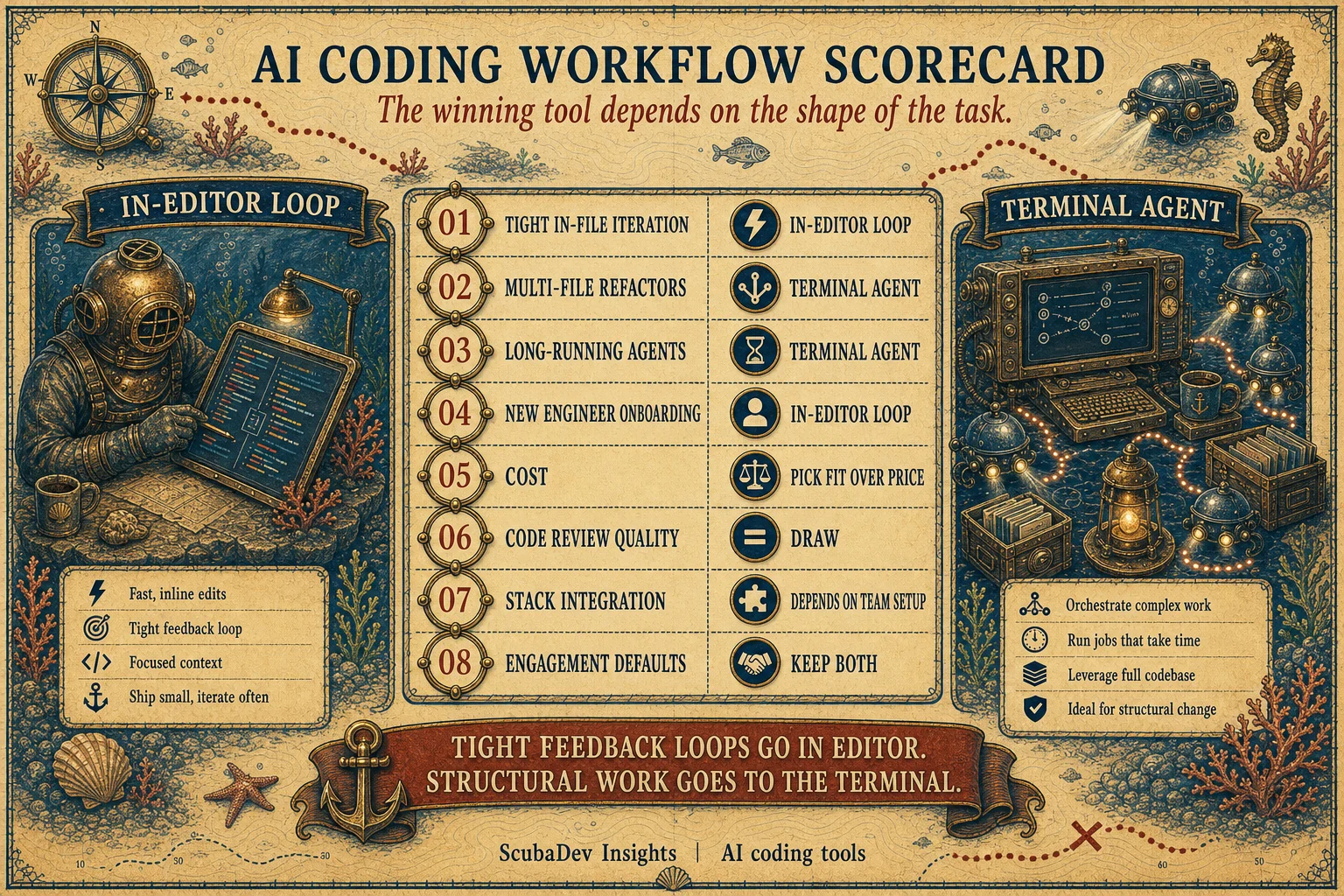
Cursor is the daily-driver IDE for tight edits, fast inline diffs, and onboarding engineers who already know VS Code. Claude Code is the terminal-native agent for multi-file refactors, long-running runs, and repo work that depends on a strong CLAUDE.md.
After 600+ engineer-hours across 14 client projects, we do not pick one. We keep both. Cursor handles the short feedback loop. Claude Code handles the broader repo move. The wrong question is which AI coding tool wins everywhere. The useful question is which one should own this task.
Our default in 2026: use Cursor below two files or when the human needs to steer every edit. Use Claude Code above five files, for test sweeps, migrations, background work, and context-heavy refactors.
Below the surface
We ran both tools under production pressure: Next.js apps, FastAPI services, Rails apps, React Native builds, Supabase functions, migrations, bug fixes, and client-side codebases we did not fully control. The result was not a clean winner. It was a routing rule.
Cursor wins when the human is inside the code, selecting a function, accepting a narrow diff, and moving again. Claude Code wins when the task needs a plan, several files, tests, background execution, or an agent that can keep working while the engineer reviews something else.


By the numbers
The production sample behind the verdict
Hands-on sample
600+ hrs
Engineer-hours spent shipping with both tools across active work.
Project spread
14
Client projects across SaaS, automation, mobile, and backend stacks.
Observed team
6+3
ScubaDev engineers plus client-side engineers whose sessions we observed.
Comparison rounds
8
Workflow rounds, from tight edits to onboarding and integrations.






01 / At a glance
Cursor vs Claude Code at a glance
Cursor is faster when the work is close to the developer: select code, ask for a change, review the inline diff, accept, run the test. That loop is the product. For most in-file edits it feels meaningfully quicker than delegating the same task to a terminal agent.
Claude Code is stronger when the work is bigger than one file. It can plan, inspect the repo, run commands, hand off independent work, and keep a long-running refactor moving. The advantage gets obvious once the task touches routing, tests, generated types, docs, and migration scripts at the same time.
The practical verdict is not tool fandom. It is routing discipline. Keep Cursor as the IDE. Drop to Claude Code when the task becomes structural.
02 / The picker
Use Cursor, use Claude Code, or use both
The fastest team is not the team that standardizes on one tool. It is the team that knows when to switch.

Use Cursor
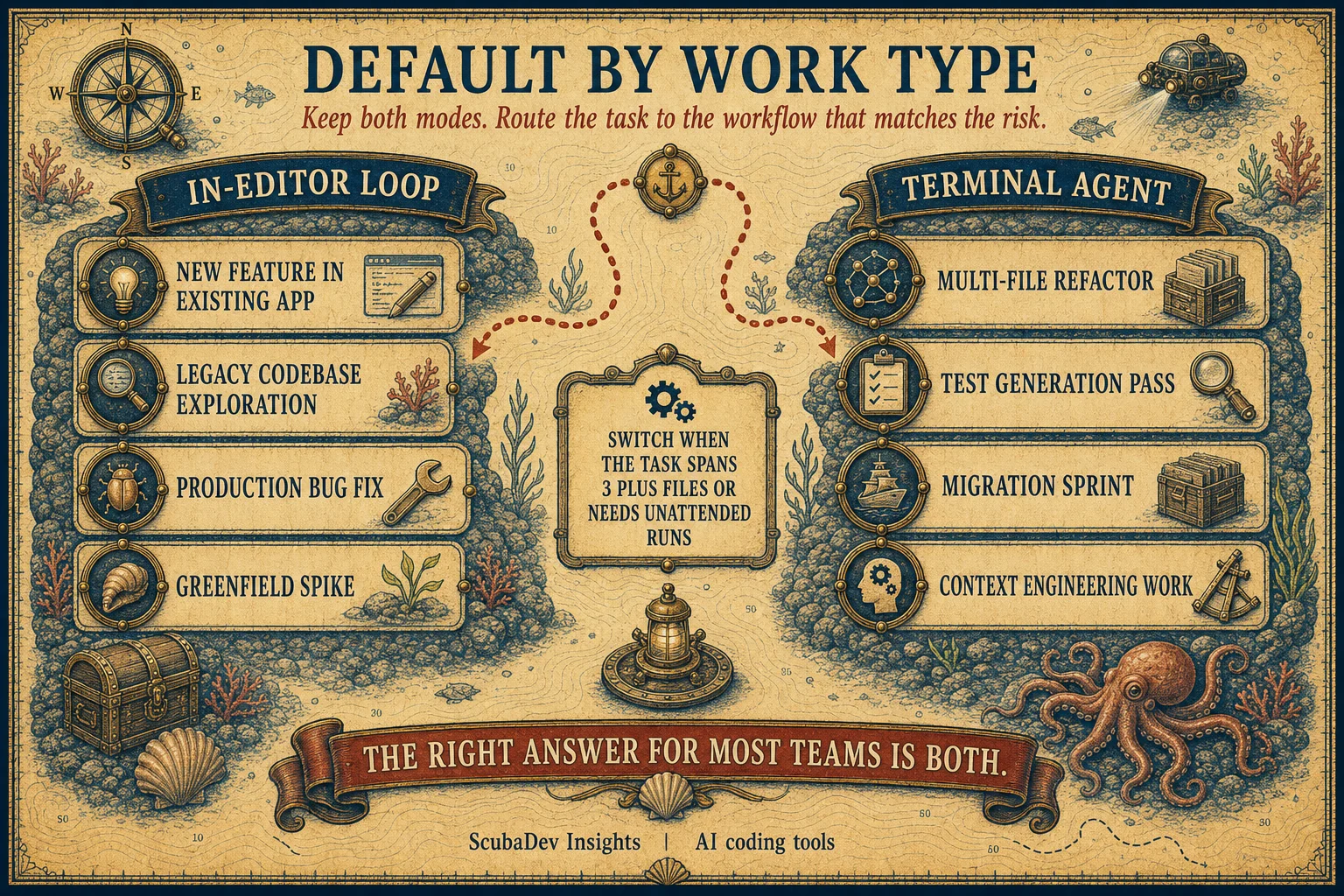
Use Cursor for tight edits, component polish, small bug fixes, file-local tests, quick docs, and onboarding. If the fastest review surface is an inline diff, stay in Cursor.

Use Claude Code
Use Claude Code for multi-file refactors, test generation passes, migrations, background work, MCP-aware workflows, and anything that benefits from a repo-level plan. If the task needs a runbook, use the terminal agent.

Use both
Use both for serious production teams. Cursor stays open as the review cockpit. Claude Code runs the broader change. The combined cost is tiny compared with one senior engineer losing an afternoon.
03 / Default by work type
Default by work type
This is the routing map we use after the first read of a task. Cursor stays closest to the human edit loop. Claude Code takes the jobs that span files, tests, migrations, or unattended runs.


04/Failure modes
What breaks in both tools
The tools are good enough to ship production code and still sharp enough to hurt you. These are the four failure modes we watch.
- 01
Cursor context drift
Long chats get stale. After several turns, Cursor can keep optimizing for an old assumption. Reset the chat or re-select the exact code before accepting another patch.
- 02
Claude token blowouts
Terminal agents can spend real money while looking productive. Put caps on API keys, use cheaper models for cheap work, and make the plan small before the run starts.
- 03
Accept-all danger
The dangerous button is not unique to either tool. Review diffs, run tests, and never accept broad generated changes in files you did not intend to touch.
- 04
Stale model assumptions
The tool market changes faster than team habits. Revisit defaults quarterly, especially model routing, MCP support, token pricing, and repository indexing quality.
05/OPERATING MODEL
What ScubaDev runs
We treat AI coding tools as a routing layer, not a religion. The same ticket can move through both tools before it becomes a pull request.
Cursor is the cockpit
Every senior engineer keeps Cursor open for exploration, local edits, inline diffs, and PR review. It is the fastest way to keep the human close to the change.
Claude Code owns repo-scale work
When a task needs a plan, test loop, migration, or background run, it moves to Claude Code with repo-specific instructions and scoped permissions.
Spend is capped by engineer
Cursor is flat. Claude Code is metered. We cap API keys, route cheap tasks to cheap models, and inspect token spend before it surprises a client.
Humans still own the merge
The agent can write the diff. It cannot own product judgment, security posture, or final architecture. Every generated change still passes through review.


FAQ
Is Cursor better than Claude Code?
A: Better for in-IDE work and onboarding. Worse for long-running agents and multi-file refactors. Neither is strictly better.
Should a serious dev team pay for both?
A: Yes. The combined cost is small compared with engineer salary, and the workflows are complementary.
Can Claude Code replace a whole engineering team?
A: No. It can multiply a senior engineer. It does not replace architecture judgment, product judgment, code ownership, or human review.
When is Cursor enough by itself?
A: For a solo founder or small app below roughly 20 files, Cursor alone is usually enough. Add Claude Code when repo-level changes become normal.
How do we prevent Claude Code token blowouts?
A: Set per-key caps, scope each run, use cheaper models for cheap work, and stop any agent that cannot summarize its plan before editing.